

Best Budget Graphics Tablet: Finding the Perfect Drawing Companion
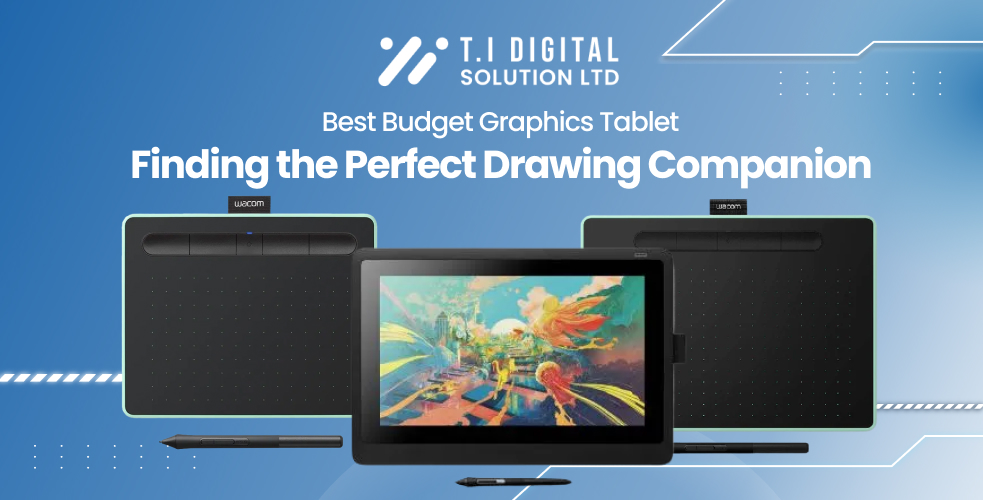
Finding the right tools can significantly impact your digital art journey. Whether you’re an aspiring artist, student, or professional looking to explore graphic design, selecting the best budget graphics tablet is essential for ensuring a smooth drawing experience without overspending. In this blog post, we’ll explore some of the best budget-friendly drawing tablets, explain the differences between graphics and drawing tablets, and review the top options available for graphic art.
What is the Best Budget Tablet for Drawing?
If you’re searching for a high-quality yet affordable drawing tablet, there are several options that strike the perfect balance between quality, features, and price. Here are some of the top budget-friendly tablets for beginners and budding artists:
- Wacom One by Wacom (CTL-472-N)
The Wacom One (CTL-472-N) is a great entry-level tablet for beginners venturing into the world of digital art. It comes with a pressure-sensitive pen that provides smooth and precise strokes, making it an ideal choice for students and aspiring artists seeking an affordable but reliable drawing experience. - Wacom Intuos Small (CTL-672-N)
The Wacom Intuos Small (CTL-672-N) offers more workspace for drawing than entry-level models. It’s compact, wireless, and budget-friendly, making it perfect for those who need flexibility and portability. This tablet is suitable for graphic design as well as digital illustrations, offering advanced features without a steep price tag. - Wacom Intuos Pro Medium (PTH-660-N)
For those who are ready to invest a bit more, the Wacom Intuos Pro Medium (PTH-660-N) offers a professional-grade drawing experience. With features like multi-touch support, customizable buttons, and superior pressure sensitivity, this tablet is perfect for those who want to create more detailed and intricate artwork without breaking the bank.
Best Budget Graphics Tablet for Graphic Art
If your focus is on graphic art, you’ll need a tablet that is precise, reliable, and fits your budget. Here are some great options:
- Wacom Intuos Pro Large (PTH-860-N)
While slightly more expensive, the Wacom Intuos Pro Large (PTH-860-N) provides a generous workspace—essential for graphic art. This model features tilt support, programmable keys, and a pressure-sensitive stylus, making it well-suited for detailed designs. - Wacom Cintiq 16 (DTK1660K0B)
For those who prefer to draw directly on a screen, the Wacom Cintiq 16 is an excellent option. While it costs more than a standard graphics tablet, the built-in screen allows for a more natural and intuitive drawing experience. It’s an excellent choice for artists looking for an affordable display tablet that provides professional-level quality.
What is the Difference Between a Graphics Tablet and a Drawing Tablet?
One common question among beginners is: what is the difference between a graphics tablet and a drawing tablet?
- Graphics Tablet: A graphics tablet, such as the Wacom One by Wacom (CTL-472-N) or Wacom Intuos Pro Medium (PTH-660-N), requires connection to an external computer or monitor. You draw on the tablet while viewing your artwork on a separate screen. These tablets are often more affordable and popular among beginners due to their ease of use and budget-friendly nature.
- Drawing Tablet: A drawing tablet, like the Wacom Cintiq 16, has a built-in display, allowing you to draw directly on the screen. This makes the drawing process more immersive and akin to traditional drawing. Although drawing tablets are generally more expensive, they are highly favored by experienced artists seeking a natural drawing experience.
What Are the Best Tablets to Draw On?
The best drawing tablet for you will depend on your experience, budget, and preferences. Here are some recommendations based on different levels:
- For Beginners: The Wacom One by Wacom (CTL-472-N) is a great starting point for those new to digital art. It’s affordable and easy to use, making it an excellent introduction to the world of drawing tablets.
- For Intermediate Artists: The Wacom Intuos Small (CTL-672-N) offers advanced features at a reasonable price, making it ideal for those who want to level up their digital art skills without making a big financial commitment.
- For Professionals: The Wacom Intuos Pro Medium (PTH-660-N) and Wacom Cintiq 16 (DTK1660K0B) are both excellent options for professional artists. They provide advanced features that cater to high-level design, illustration, and other forms of digital art.
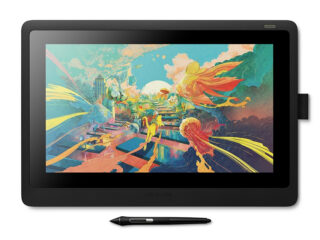
Wacom Cintiq 16 (DTK1660K0B)
Device Type Digitiser
Width42.2 cm Depth2.45 cm Height28.5 cm
Connectivity Technology Wired
OS Required Microsoft Windows 7 or later, Apple MacOS X 10.11 or later
Interfaces 1 x USB 2.0 ¦ 1 x display / video - HDMI
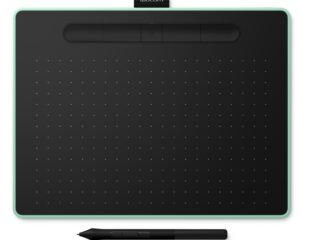
Wacom Intuos (CTL-6100WLE-N)
Device Type Digitiser
Depth 0.88 cm Width 26.4 cm Height 20 cm
Connectivity Technology Wireless, wired
OS Required Microsoft Windows 7 or later, Apple MacOS X 10.11 or later
Interfaces 1 x USB - 4 pin USB Type A
Which Tablet is Best for Graphic Art?
If you’re focusing specifically on graphic art, you need a tablet that offers high precision and control over your artwork. Two great options for this are:
- Wacom Intuos Pro Medium (PTH-660-N): Ideal for those who prefer a more traditional experience using an external screen, this tablet provides the accuracy and versatility needed for graphic design projects.
- Wacom Cintiq 16 (DTK1660K0B): This drawing tablet is perfect for graphic artists who want to work directly on the screen, offering a more engaging and intuitive experience.
Should You Choose a Drawing Tablet or a Graphics Tablet?
The decision between a drawing tablet and a graphics tablet depends largely on your budget and personal preferences:
- Graphics Tablets: If you’re on a tight budget and just starting, a graphics tablet like the Wacom One by Wacom (CTL-472-N) or Wacom Intuos (CTL-672-N) is an excellent choice. These models are affordable, and while they have a learning curve, they offer a lot of value for the price.
- Drawing Tablets: If you have a bigger budget and want a more immersive experience, a drawing tablet like the Wacom Cintiq 16 is a great choice. It allows you to draw directly on the display, which many artists find to be a more comfortable and natural way of creating.
Is It Hard to Draw with a Graphics Tablet?
Drawing with a graphics tablet can feel different if you’re accustomed to traditional pen and paper. Initially, it may take some practice to get used to looking at your monitor while drawing on a separate surface, but many artists eventually find the added features, such as pressure sensitivity and easy editing, to be worth it.
For those who are concerned about the learning curve, starting with an entry-level graphics tablet like the Wacom One by Wacom (CTL-472-N) is a good idea. This model is budget-friendly and will help you get comfortable with digital drawing without a huge investment.
Conclusion
Choosing the best budget graphics tablet depends on your experience level and what you want to achieve with your digital art. For those starting out, the Wacom One by Wacom (CTL-472-N) provides an affordable introduction to the world of digital art. Intermediate artists can explore more advanced options with the Wacom Intuos (CTL-672-N), while professionals might prefer the versatility of the Wacom Intuos Pro Medium (PTH-660-N) or the direct drawing experience of the Wacom Cintiq 16 (DTK1660K0B).
No matter where you are on your artistic journey, there is a graphics tablet that will suit your needs. Assess your requirements, consider your budget, and find the perfect tool to support and inspire your creativity.
Links to Our Blog Articles:

About Daniel
Laptop & Computing Technology Expert. Daniel has a passion for testing laptops, tablets, and accessories that make everyday work faster and smarter. Whether it’s a high-performance Dell laptop or a reliable tablet for creatives, Daniel’s reviews focus on real-world performance and what actually matters to users.
View all posts by Daniel