Best Graphic Tablet for Beginners: Choosing the Right Tablet for Drawing

Best Graphic Tablet for Beginners_ Choosing the Right Tablet for Drawing

Graphic tablets are essential tools for aspiring artists and designers, offering precision and flexibility for digital artwork. Whether you’re a beginner or looking to improve your creative skills, choosing the right tablet can be overwhelming with so many options available. In this guide, we’ll explore some of the best graphic tablets for beginners, explain the differences between graphic and drawing tablets, and help you determine which tablet best suits your needs.

Best Tablet for Drawing with a Pen

One of the primary features artists look for in a drawing tablet is how well it mimics the experience of drawing with a pen. Tablets like the Wacom CTL-4100WLE-N and Wacom CTL-6100WLE-N offer beginner-friendly options, known for their high-quality pens that provide precise control. These tablets are compact, lightweight, and perfect for artists who are just getting started. They allow beginners to practice and refine their drawing skills with pressure-sensitive pens that create natural strokes.

When choosing the best tablet for drawing with a pen, it’s essential to consider the following features:

  • Pressure Sensitivity: A higher pressure sensitivity offers more control over line thickness and opacity.
  • Pen Responsiveness: The smoother and more responsive the pen is, the better the drawing experience.

For beginners, the Wacom CTL-4100WLE-N is an excellent choice due to its portability, simplicity, and affordability.

Best Drawing Tablet with Screen

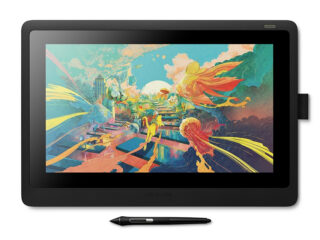
For those who prefer a more immersive experience, drawing tablets with screens allow you to see your artwork directly under your pen, making the drawing experience feel even more natural. The Wacom DTH-2420 is a popular choice, offering a high-resolution display that provides clear, vibrant visuals, making it one of the best drawing tablets with a screen.

Screened tablets like the Wacom DTK1660K0B and Wacom DTK2260K0A are excellent for beginners who are ready to invest in more advanced tools. These models provide larger working areas, and the ability to work directly on the screen enhances precision and creativity.

Key benefits of drawing tablets with screens:

  • Direct Interaction: You can draw directly on the display, which offers a more intuitive experience.
  • Better Visualization: The ability to see your artwork as you draw enhances the creative process.

What is the Best Touch Screen Drawing Tablet?

Touchscreen functionality adds versatility to drawing tablets, allowing you to interact with your artwork through both touch and pen. For beginners who want a tablet that offers multi-touch features, the Wacom DTH-2420 is an excellent option. It supports multi-touch gestures, enabling users to zoom, pan, and rotate the canvas with ease.

When choosing the best touch screen drawing tablet, consider:

  • Screen Size: Larger screens provide more space to work but may be less portable.
  • Touch Responsiveness: Ensure the tablet has smooth touch gestures for a seamless experience.

Comparison of Wacom Cintiq 16 (DTK1660K0B) and Wacom Intuos (CTL-6100WLE-N)

Wacom DTK1660K0B Cintiq 16 graphic tablet Black 5080 lpi 344.16 x 193.59 mm

Wacom Cintiq 16 (DTK1660K0B)

Device Type Digitiser

Width42.2 cm Depth2.45 cm Height28.5 cm

Connectivity Technology Wired

OS Required Microsoft Windows 7 or later, Apple MacOS X 10.11 or later

Interfaces 1 x USB 2.0 ¦ 1 x display / video - HDMI

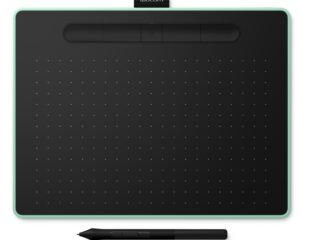
Wacom CTL-6100WLE-N Intuos M Bluetooth graphic tablet Black, Green 2540 lpi 216 x 135 mm USB/Bluetooth

Wacom Intuos (CTL-6100WLE-N)

Device Type Digitiser

Depth 0.88 cm Width 26.4 cm Height 20 cm

Connectivity Technology Wireless, wired

OS Required Microsoft Windows 7 or later, Apple MacOS X 10.11 or later

Interfaces 1 x USB - 4 pin USB Type A

What is the Difference Between a Graphic Tablet and a Drawing Tablet?

A common question beginners ask is, “What’s the difference between a graphic tablet and a drawing tablet?” While both terms are often used interchangeably, there are key differences:

  • Graphic Tablets: These are typically non-screen tablets that require a connection to a computer. You draw on the tablet while viewing your artwork on a separate screen. The Wacom CTL-6100WLE-N is an example of a graphic tablet.
  • Drawing Tablets with Screens: These tablets, like the Wacom DTK1660K0B, have built-in displays, allowing you to draw directly on the screen. They offer a more immersive experience but are often more expensive.

For beginners, starting with a graphic tablet can be more cost-effective, while advanced users may prefer a drawing tablet with a screen for more direct interaction.

What Drawing Tablet Should a Beginner Use?

Choosing the right drawing tablet for a beginner depends on several factors such as budget, intended use, and personal preferences. Here are some recommendations based on different needs:

  • Budget-Friendly Option: The Wacom CTL-4100WLE-N is an excellent choice for beginners looking for an affordable, easy-to-use tablet.
  • Intermediate Option: The Wacom CTL-6100WLE-N offers a larger working area and more advanced features, making it suitable for beginners who are serious about improving their skills.
  • Advanced Option with Screen: For those willing to invest more, the Wacom DTK1660K0B or Wacom DTH-2420 offers the best drawing experience with a built-in screen and touch functionality.

Each of these tablets provides unique benefits for beginners, depending on the level of investment and the type of work you plan to do.

Conclusion

Finding the best graphic tablet for beginners doesn’t have to be difficult. Whether you’re looking for a tablet with a pen, a drawing tablet with a screen, or a touchscreen option, Wacom offers a variety of models to meet your needs. For a simple and cost-effective start, the Wacom CTL-4100WLE-N is a great option. If you prefer drawing directly on the screen, the Wacom DTH-2420 offers a more immersive experience.

When choosing a drawing tablet, always consider what will help you grow as an artist. Whether it’s the affordability of a basic graphic tablet or the advanced features of a screen tablet, the right tool will enhance your creative journey.

Link to our Blog Articles:

Leave a Reply

Your email address will not be published. Required fields are marked *