When it comes to graphic design, finding the right tools can significantly impact your workflow and creativity. Tablets are a crucial part of the toolkit for many designers, offering versatility, precision, and mobility. But with so many options available, which tablet is best for your graphic design needs? Let’s explore the answers to the most frequently asked questions and take a look at some top recommendations.
What is the Best Tablets for Graphic Designers?
The best tablet for graphic designers largely depends on your specific needs, such as whether you prioritize portability, a large working area, or compatibility with specific software.
For professionals and serious hobbyists, Wacom tablets have long been the gold standard in the industry. Known for their precision and quality, they’re compatible with most design software and provide a seamless experience for artists working with programs like Adobe Illustrator or Photoshop.
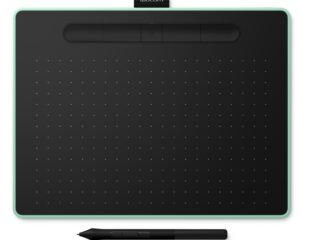
For beginners or those on a budget, the Wacom Intuos CTL-472-N or CTL-672-N are excellent choices. These entry-level models offer great sensitivity, accuracy, and an intuitive experience without overwhelming features. They are perfect for starting your journey in graphic design.
If you’re looking for more advanced features, the Wacom Intuos Pro PTH-660-N or PTH-860-N come highly recommended. These models are known for their customizable touch rings and buttons, tilt recognition, and high pen pressure sensitivity, making them ideal for intricate design tasks.
Should I Get a Drawing Tablet or a Graphic Tablet?
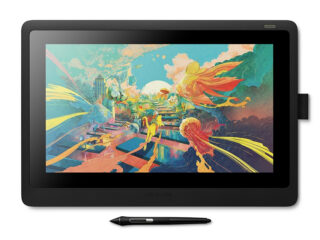
The terms “drawing tablet” and “graphic tablet” are often used interchangeably, but there is a subtle difference. A graphic tablet requires a computer to function, while a drawing tablet often comes with its own screen, allowing you to draw directly on the tablet.
For graphic design, many professionals prefer graphic tablets because they are more powerful and offer more precise control. However, if you need something portable and versatile, a drawing tablet with a built-in screen might be a better option.
The Wacom Intuos Pro PTH-660-N and PTH-860-N offer the best of both worlds with the precision of a graphic tablet and the convenience of a drawing surface.
Do I Need a Wacom for Graphic Design?
While Wacom is the industry leader in graphic tablets, it’s not the only option. That said, Wacom tablets are preferred by many professional designers due to their superior build quality, advanced features, and robust compatibility with creative software.
The Wacom Intuos Pro series, for example, offers unmatched performance with features like tilt recognition, multi-touch, and high levels of pen pressure sensitivity. While other brands have developed competitive products, Wacom remains the top choice for serious graphic designers.
Should I Use a Drawing Tablet for Illustrator?
Adobe Illustrator is one of the most popular tools for vector-based graphic design. A drawing or graphic tablet significantly enhances the experience of using Illustrator by providing more precision and control than a standard mouse.
For Illustrator, a tablet like the Wacom Intuos Pro PTH-660-N or PTH-860-N would be perfect. These tablets provide pressure-sensitive strokes, which help create smoother lines and more detailed vector designs. If you want to take full advantage of Illustrator’s capabilities, a tablet can be a game-changer.
Recommended Products
Here are some top Wacom tablets that we sell:
- Wacom Intuos CTL-472-N: Ideal for beginners, this compact, budget-friendly tablet offers a smooth and responsive experience.
- Wacom Intuos CTL-672-N: This medium-sized tablet provides a larger working area for more detailed designs and enhanced comfort.
- Wacom Intuos Pro PTH-660-N: A favorite among professionals, this tablet offers advanced features such as customizable buttons, tilt recognition, and multi-touch capabilities.
- Wacom Intuos Pro PTH-860-N: The ultimate tablet for professional designers, offering a large surface, customizable buttons, and excellent precision.