Types of Ubiquiti switches (how to think about them?)
Ubiquiti splits switches for different roles. Pick by function, not just model name.
Access switches
For edge devices: laptops, WiFi Access Points, VOIP Phones, Cameras. Often provide PoE.
Use case: small office wiring closet powering APs and IP phones.
Distribution / Aggregation switches
These sit at the core of a site. They handle uplinks between access switches and the data center. Expect SFP+/10G ports and higher throughput.
Use case: campus backbone connecting multiple floors.
Enterprise / Core switches
High-performance switches with Layer-3 features, multi-gig uplinks, advanced routing and QoS.
Use case: large campuses, service provider closets.
Pro / Hybrid switches
A middle ground for SMBs that need more speed or PoE budget than entry gear but don’t need full enterprise price tags.
Key features explained (simple, practical)
Power over Ethernet (PoE)
PoE lets you power Wi-Fi APs, IP cameras, and phones from the switch. PoE+ (up to 30W per port) covers most APs and cameras. Check the switch PoE budget — total wattage across ports.
Example PoE budget: a common enterprise UniFi switch might have a 370W budget. If an AP averages 12.95W:
- 24 APs × 12.95W = 310.8W, which fits a 370W budget.(Always calculate device draw × number of ports; leave headroom for peaks.)
VLANs (Virtual LANs)
VLANs separate traffic. Put guest Wi-Fi on VLAN 10 and staff devices on VLAN 20. VLANs improve security and reduce broadcast domains.
Link aggregation (LACP)
Combine multiple ports to increase bandwidth and create redundancy. Two 10G SFP+ links aggregated carry ~20G (logical). This is useful for uplinks between switches.
Uplink speeds (10G, 25G)
For aggregation and core switches, choose 10G or 25G uplinks depending on traffic. Small offices rarely need more than 10G.
UniFi Controller integration
The UniFi Network Application centralizes adoption, firmware updates, VLAN settings, port profiles, monitoring, alerts, and role-based access.
QoS, STP & multicast
Quality of Service (QoS) helps voice/video. Spanning Tree Protocol (STP/RSTP) prevents loops. IGMP snooping manages multicast efficiently (important for streaming or some surveillance setups).
Best Ubiquiti switches for SMBs vs Enterprises (practical picks)
- SMBs / branch offices: USW-Ultra, USW-Ultra-60W, USW-Ultra-210W — easy manageability, cost-effective PoE.
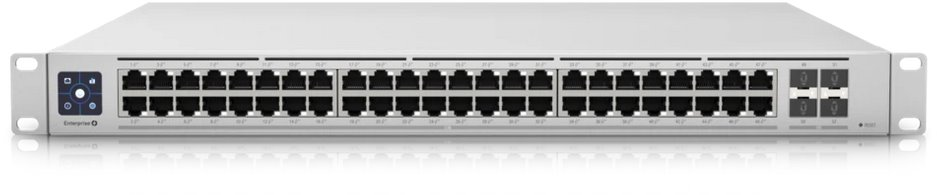
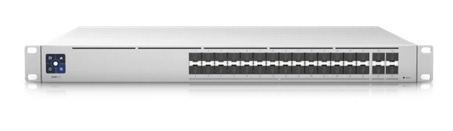
- Enterprises / data centers: USW-Enterprise-48-PoE, USW-Pro-Aggregation — higher throughput, 10G/25G uplinks, L3 features.
- Retail / small hospitality: Smaller POE Switches powering APs and PoE cameras with clear PoE budget planning.
Setup & configuration with UniFi Controller — a practical walkthrough
- Physical install. Rack or shelf the switch, connect uplink to router/firewall.
- Power and connect. Power the switch and connect a laptop to the same network as your UniFi Controller.
- Adopt the switch. In UniFi Controller, click “Adopt” when the switch appears. Wait for firmware sync.
- Create networks (VLANs). Define Network → Create Network: VLAN 10 (guest), VLAN 20 (staff).
- Port profiles. Assign ports to VLANs or use trunk ports for APs (native VLAN tag). Set PoE mode (auto/manual).
- PoE budget planning. Calculate device draw and leave ~20% headroom for spikes.
- Link aggregation. Create a LACP group in the Controller, assign aggregated ports on both ends.
- Monitor. Use Controller’s insights for throughput, client counts and alerts.
Practical example: For a café with 3 APs and 4 PoE cameras:
- APs ~13W each → 3×13 = 39W.
- Cameras ~8W each → 4×8 = 32W.
- Total ~71W. A 150–200W PoE switch suits this deployment.
Ubiquiti vs other brands (short, honest comparisons)
Ubiquiti vs Cisco
- Cisco: Mature enterprise feature set, stable, great support, higher cost.
- Ubiquiti: Easier to deploy, better price/performance for SMBs, modern UI. For very large or regulated networks, Cisco still leads.
Ubiquiti vs Aruba (HPE)
- Aruba: Excellent enterprise wireless and policy features; often chosen by large enterprises requiring deep integration.
- Ubiquiti: Competitive on price and simpler for mid-market deployments.
Ubiquiti vs TP-Link
- TP-Link: Very cost-effective; lower feature depth and ecosystem integration.
- Ubiquiti: Better centralized management, more enterprise features and scalability.
Ubiquiti vs MikroTik
- MikroTik: Powerful and granular; excellent for network engineers who want CLI control and advanced routing.
- Ubiquiti: Simpler GUI-driven management and tighter ecosystem integration with APs, gateways, and Protect cameras.
How to choose the right Ubiquiti switch — checklist
- Port count now and later. Buy for future growth, not just today.
- PoE vs non-PoE. Map devices that need power.
- PoE budget. Add up device wattage and add ~20% headroom.
- Uplink speed. Do you need 1G, 10G, or 25G uplinks?
- SFP / SFP+ support. Needed for fiber or high-speed uplinks.
- Management features. Do you need L3 routing, OSPF, SNMP support?
- Redundancy & stacking. Do you need redundant power supplies or stacking?
- Noise & form factor. Fanless for offices; rackmount for data centers.
- Warranty & support. Consider extended support if needed.
Troubleshooting & common issues
Device won’t adopt
- Ensure Controller and device are on same Layer-2. Check SSH/SSH key if adoption fails. Try power cycle and factory reset.
PoE not supplying power
- Confirm device PoE type (802.3af vs 802.3at). Check Controller PoE settings and total PoE budget.
Slow speeds
- Check cable type (Cat6 for 10G short distances), duplex, and port negotiation. Verify SFP modules and transceivers.
Network loops and broadcast storms
- Use STP/RSTP and check port mirroring and logs. Disable unused ports or put them in an isolated VLAN.
Firmware & compatibility
- Match Controller version with device firmware. Keep backup configs before major upgrades.
Tools: UniFi Controller logs, port statistics, packet capture (on gateway), and physical checks (cabling, SFPs).
FAQs:
Conclusion:
Ubiquiti network switches give businesses strong value: centralized management, PoE support, VLANs, and scalable uplink options. They fit SMBs perfectly and can be configured to support larger campus deployments. Choose a model based on port count, PoE budget, uplink speed, and management needs. Use the UniFi Controller for consistency and easier troubleshooting. With the right planning, Ubiquiti can be a reliable, cost-efficient backbone for your network.