Why Choose a Ubiquiti 16-Port Switch?
- Port capacity & scalability: 16 RJ-45 ports allow connection of many devices like APs, cameras, VoIP Phones, networked storage, plus uplinks. As your setup grows, more devices can be added without substituting the switch.
- PoE to power devices: Many Ubiquiti switches offer PoE or PoE+ (and in some cases PoE++) so you can power APs, cameras or phones directly from the switch, reducing power adapters and simplifying setup.
- UniFi Controller integration: Unified management, firmware control, monitoring, VLANs, port profiles etc. The UniFi Network (Controller / Application) lets you manage edge, aggregation, and enterprise gear from one pane of glass.
- Uplinks & link aggregation: The ability to have uplink speed (SFP, 1G/10G/2.5G etc.) is vital for future-proofing, especially if you plan to connect to a backbone or link multiple switches.
- Pricing & total cost of ownership: Ubiquiti tends to offer great value vs legacy enterprise brands, particularly for SMBs, while keeping strong features.
If you’re just starting with Ubiquiti hardware, check out our Ubiquiti Network Switches: Complete Guide for Businesses and IT Professionals
What to Look for in a 16-Port Switch?
Before you buy, check for:
- PoE / PoE+ / PoE++: How many ports support it, what the maximum wattage per port is, and what total PoE budget the switch has.
- Layer 2 vs Layer 3 features: If you need inter-VLAN routing, static routes, or advanced ACLs, choose a Switch with Layer 3; otherwise Layer 2 may suffice.
- Uplink ports / speed: SFP / SFP+ / 10G / 2.5G etc. If the switch is going to feed into a high-bandwidth core, you need fast uplinks.
- Throughput & switching capacity: Total non-blocking throughput, forwarding rate, etc. Helps avoid bottlenecks.
- Power budget and cooling: PoE draws power; also can generate heat. Fanless units are quieter but may have lower budget.
- Form factor: Rack mount vs desktop vs wall / fanless etc.
- Features & protocols: VLANs, LACP, STP, QoS, IGMP snooping, ACLs, etc.
Comparison Table: USW-Pro-Max-16-PoE vs USW-16-PoE vs USW-Lite-16-PoE
If you’re not sure whether you need a PoE or non-PoE model, we’ve explained what a PoE Network Switch is and Why You Should Consider It.
Detailed Reviews of 16 Port Ubiquiti Switches:
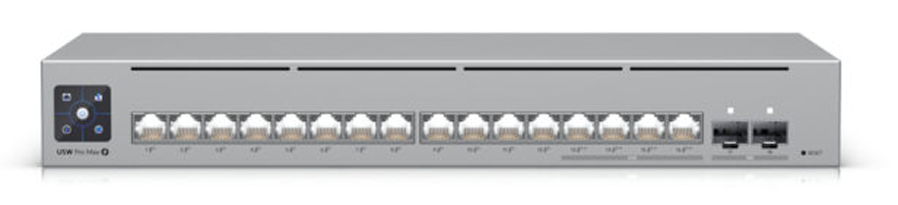
1. USW-Pro-Max-16-PoE:
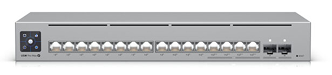
This is the top-tier 16-port Ubiquiti offering. With 180W PoE availability, you can power many high-draw PoE++ devices. It supports Layer 3 routing, making it valuable if you want inter-VLAN routing without a separate router. The two 10G SFP+ uplinks plus 2.5 GbE RJ45 allow faster backbone links. The switch capacity and forwarding rate are high (84 Gbps switching capacity, ~62 Mpps) which means minimal bottleneck under heavy load. Great for businesses or offices planning to expand or needing more demanding power/throughput.
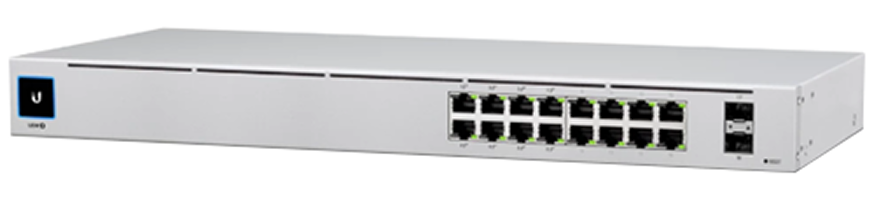
2. USW-16-PoE:
This is the mid-range sweet spot. 16 Gigabit RJ45 ports, 8 PoE+ ports, 2 SFP for uplinks. Total PoE budget of about 42W. Good if you’re powering moderate number of APs, cameras, VoIP phones. Less headroom than the Pro-Max, and no Layer 3 features, but much more affordable and quieter (fanless or with controlled cooling). Perfect for SMBs.
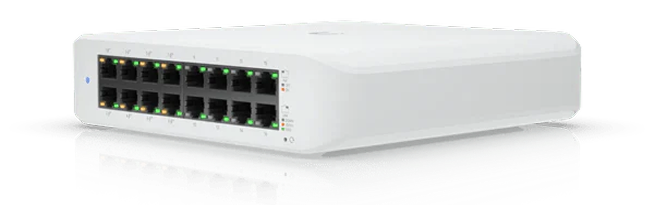
3. USW-Lite-16-PoE:
If your needs are lighter — a home lab, small branch, or just powering a few PoE devices — this model gives you 8 PoE+ ports, decent PoE budget (~45W), fanless operation for quietness, manageable graphing via UniFi Controller. Less in terms of uplink speed (RJ45 only in many cases), no 10G, no Layer 3 features, less capacity — but excellent value and lower power draw.
How to Decide: Use Case Scenarios?
Scenario
Home network / home office with few APs + cameras.
Small business / boutique office needing to power ~8 PoE devices + backbone link.
Growing business needing higher throughput, more PoE draw, inter-VLAN routing, future growth.
Reason
Quiet, sufficient power, compact, price-friendly.
Balanced PoE budget, some uplink flexibility, decent throughout.
High PoE, Layer 3, faster uplinks, future-proofed Architecture.
Ubiquiti vs Other Brands for 16-Port Switches:
When choosing, you’ll notice similar models from Cisco, Aruba, TP-Link etc. Here’s how Ubiquiti compares, particularly in the 16-Port PoE / Managed Switch segment:
- Cisco tends to cost significantly more for comparable Layer 3 and PoE budgets; often includes enterprise support and heavy duty hardware.
- Aruba / HPE offers strong security, policy features, and reliability; but again, pricing tends to be higher and management can be more complex.
- TP-Link offers more budget switches; may match some PoE specs, but often with less advanced switching capacity, less refined UI, fewer features like link aggregation, routing, or VLAN performance.
- For many SMBs, Ubiquiti hits a sweet balance: good performance, solid PoE, modern UI, and integration with the UniFi ecosystem (APs, security gateways, Protect, etc.).
Buying Guide: What to Prioritize?
When searching for the Best Ubiquiti 16-Port Switch, keep these in mind:
- Total PoE Budget → Sum all your powered devices’ max wattage + leave headroom (~20-30%)
- Port types → How many ports need PoE? How many just need data? Do you need 2.5G or 10G uplinks?
- Layer 2 vs Layer 3 → Do you need routing between VLANs / static routes inside the switch? If yes, go Pro models.
- Throughput and switching capacity → For heavy traffic, ensure non-blocking throughput is sufficient.
- Form factor & cooling → Fanless is ideal if noise matters. Rack mount if integrating into racks.
- Long-term support & firmware → Ubiquiti provides regular updates. Check compatibility with latest version of UniFi Controller / Network Application.
Setup & Configuration Tips for These Switches
- Use UniFi Controller to adopt the switch and push firmware updates.
- Define VLANs: e.g. VLAN10 → Guest WiFi, VLAN20 → Corporate, etc.
- Assign PoE ports based on device needs; avoid overloading the budget.
- Use link aggregation (LACP) for uplinks if supported, especially on Pro-Max, to avoid single point of congestion.
- Monitor usage through Controller dashboards: look at PoE draw, port utilization, temperature.
- For Pro-Max models: configure routing or inter-VLAN if needed; for Lite & Standard models: focus on layer 2 + segmentation.
FAQs:
Conclusion:
If you’re looking for a Ubiquiti 16-Port Switch, the right model depends on your power needs and future plans:
- For the most demanding, with high PoE draw and uplink speed, the USW-Pro-Max-16-PoE is the premium choice.
- For many SMBs that need reliable power and solid performance without breaking the bank, the USW-16-PoE offers excellent value.
- And for lighter uses, home labs, quieter environments, USW-Lite-16-PoE gives you what you need at the lowest cost and with minimal noise.
Match your devices’ PoE requirements and bandwidth to the switch’s specifications, check uplink needs, and ensure future growth is considered. With that, you’re set to pick the best 16-port Ubiquiti switch for 2025.