

Touch Screen Laptops – Intuitive Computing at Your Fingertips
Touch screen laptops bring the ease of a tablet and the power of a traditional laptop into one device. Whether you’re a student jotting notes, a designer sketching ideas, or someone who prefers tapping and swiping over clicking, touch-enabled laptops enhance productivity and convenience.

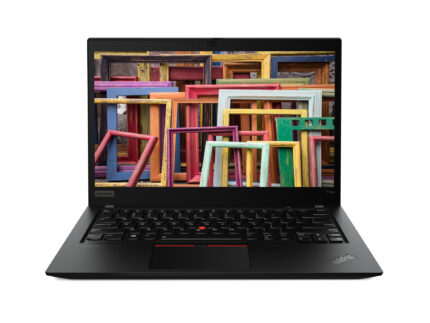

Key Features:
| RAM | 16 GB |
| Storage | 512 GB SSD |
| Processor | AMD Ryzen 5 |
| Brand | Lenovo |
| Model Name | ThinkPad T14s |
| Operating system | Windows 10 Pro |
| Graphics card | AMD Radeon Graphics |
| Product type | Laptop |
| Housing material | Magnesium |
| Form factor | Clamshell |
| Product colour | Black |
| HD type | Full HD |
| Panel type | IPS |
| LED backlight | Yes |
| Display brightness | 300 cd/m² |
| Touchscreen | Yes |
| Display resolution | 1920 x 1080 pixels |
| Display diagonal | 35.6 cm (14") |
| Anti-glare screen | Yes |
| Native aspect ratio | 0.672916667 |
| Card reader integrated | Yes |
| Compatible memory cards | MicroSD (TransFlash) |
| Total storage capacity | 512 GB |
| Total SSDs capacity | 512 GB |
| NVMe | Yes |
| Discrete graphics card | No |
| On-board graphics card family | AMD Radeon Graphics |
| On-board graphics card | Yes |
| On-board graphics card model | AMD Radeon Graphics |
| Discrete graphics card model | Not available |
| On-board GPU manufacturer | AMD |
| Audio chip | Realtek ALC3287 |
| Number of microphones | 2 |
| Audio system | Dolby Audio |
| Number of built-in speakers | 2 |
| Speaker power | 1 W |
| Built-in microphone | Yes |
| Front camera | Yes |
| Front camera resolution | 1280 x 720 pixels |
| Privacy camera | Yes |
| Privacy type | Privacy shutter |
| Front camera HD type | HD |
| Infrared (IR) camera | Yes |
| Optical drive type | No |
| Mobile network connection | No |
| Top Wi-Fi standard | Wi-Fi 6 (802.11ax) |
| Near Field Communication (NFC) | No |
| Wi-Fi standards | Wi-Fi 6 (802.11ax) |
| Bluetooth | Yes |
| Bluetooth version | 5.2 |
| WWAN | Installed |
| USB 3.2 Gen 1 (3.1 Gen 1) Type-A ports quantity | 2 |
| USB 3.2 Gen 1 (3.1 Gen 1) Type-C ports quantity | 0 |
| USB 3.2 Gen 2 (3.1 Gen 2) Type-C ports quantity | 2 |
| USB Type-C DisplayPort Alternate Mode | Yes |
| USB Sleep-and-Charge ports | 1 |
| USB Sleep-and-Charge | Yes |
| USB 2.0 ports quantity | 0 |
| HDMI ports quantity | 1 |
| HDMI version | 2 |
| Ethernet LAN (RJ-45) ports | 1 |
| Combo headphone/mic port | Yes |
| Docking connector | Yes |
| USB Power Delivery (USB PD) | Yes |
| Motherboard chipset | AMD SoC |
| Pointing device | ThinkPad UltraNav |
| Numeric keypad | No |
| Spill-resistant keyboard | Yes |
| Keyboard backlit | Yes |
| Keyboard language | English |
| Operating system language | English |
| Operating system architecture | 64-bit |
| Housing material | Magnesium |
| Form factor | Clamshell |
| Product colour | Black |
| Sustainability certificates | ENERGY STAR, EPEAT Gold |
| Compliance certificates | RoHS |
| Battery technology | Lithium Polymer (LiPo) |
| Battery life (max) | 15.9 h |
| Battery capacity | 57 Wh |
| AC adapter power | 65 W |
| AC adapter frequency | 50/60 Hz |
| AC adapter input voltage | 100 - 240 V |
| USB Power Delivery (USB PD) | Yes |
| Password protection | Yes |
| Cable lock slot type | Kensington |
| Trusted Platform Module (TPM) | Yes |
| Password protection type | HDD, Power on, Supervisor |
| Fingerprint reader | Yes |
| Cable lock slot | Yes |
| Smart card reader | No |
| Trusted Platform Module (TPM) version | 2 |
| Operating temperature (T-T) | 5 - 35 °C |
| Storage temperature (T-T) | 5 - 43 °C |
| Operating relative humidity (H-H) | 8 - 95% |
| Storage relative humidity (H-H) | 5 - 95% |
| Certification | ENERGY STAR,EPEAT Gold,RoHS |
| MIL-STD-810G compliant | Yes |
| Compliance certificates | RoHS |
| Sustainability certificates | ENERGY STAR, EPEAT Gold |
| Width | 329 mm |
| Depth | 226.2 mm |
| Height | 16.7 mm |
| Weight | 1.35 kg |

Touch Screen Laptops — Flexible, Intuitive Computing for Work, Study & Creative Tasks
Touch screen laptops offer a more natural way to interact with your device. Whether you prefer tapping through menus, sketching ideas, annotating documents or switching quickly between tasks, touchscreen technology brings a level of convenience that traditional keyboards and trackpads can’t match. These devices combine the familiarity of a laptop with the fluid input style of a tablet — ideal for users who value flexibility in their daily workflow.
A Versatile Choice for Modern Users
Touch screen laptops are designed for users who blend different types of activities throughout the day. They work well for:
- Students taking notes or revising
- Home users browsing, emailing or organising documents
- Creative users who sketch or mark up content
- Professionals moving between meetings and collaborative tasks
- Remote workers who value flexibility and portability
The ability to tap, swipe and draw directly on the display makes these devices suitable for hands-on, visual and interactive work.
2-in-1 & Convertible Designs for Added Convenience
Many touchscreen models come with flexible hinges that allow you to switch between laptop, tablet and presentation modes. This makes them suitable for mixed environments such as study spaces, offices and travel.
Common design types include:
- Convertible Laptops (360° hinge)
Ideal for presentations, creative sessions or digital note-taking.
Useful for students and hybrid workers.
- Detachable Laptops
Offer tablet-style handling with laptop-level power.
Great for handwriting and portable workflows.
- Standard Touchscreen Notebooks
Suitable for users who want touch input without a full 2-in-1 design.
If you are considering a more premium take on portability, models in the Lenovo Yoga or ASUS ZenBook categories may also be worth exploring.
Pen & Stylus Support for Creative or Note-Taking Tasks
For users who frequently write, draw or annotate, stylus-enabled models offer precise control. Many devices support:
- digital handwriting
- sketching
- marking up PDFs
- whiteboarding and brainstorming
These features are particularly useful for:
- design students
- illustrators
- users who prefer handwritten notes
- professionals who review documents regularly
Options Across Brands & Budgets
Touch screen laptops are available across various price points:
- HP provides practical everyday touchscreen options for work and study
- Lenovo offers flexible 2-in-1 models with strong durability
- ASUS delivers bright, colour-rich displays ideal for creative work
- Dell provides office-ready touchscreen models for professional use
- Acer offers accessible, budget-friendly touchscreen devices
This variety makes it easy to find a configuration that fits your needs and budget.
If you require additional storage or performance enhancements later, consider exploring our Internal SSDs, a common upgrade path for touch-enabled laptops.
Why Choose a Touch Screen Laptop?
- Natural, intuitive interaction
- Useful for note-taking and sketching
- Great for presentations and collaborative tasks
- Portable and suitable for hybrid working
- Available in multiple sizes and designs
- Suitable for home, study and light professional use
Touchscreen laptops bring versatility to tasks that benefit from direct input — making them a smart choice for users who want something more interactive than a standard notebook.
FAQ — Touch Screen Laptops
Are touch screen laptops good for school or university?
Yes. They’re excellent for handwritten notes, reading material and mixed coursework.
Do touchscreen laptops use more battery?
Slightly, but modern designs minimise the impact and still offer strong battery life.
Is a 2-in-1 better than a standard touchscreen?
A 2-in-1 offers more flexibility. Standard touchscreen laptops suit users who prefer traditional layouts.
Do touch screens affect durability?
No. Modern touch panels are designed for everyday use and resist typical wear.